Lead Generation Form Template
A lead generation form is a form that collects a prospect's name, work email, company and main need so a sales or marketing team can follow up with the people most likely to buy. This template adds four short qualifying questions on role, team size, timeline and budget, so reps can sort hot leads from early researchers without a discovery call.
- 11 questions
- One page
- ~2 min
- To fill in
- Direct layout
- Mobile-ready
- Free
- No credit card
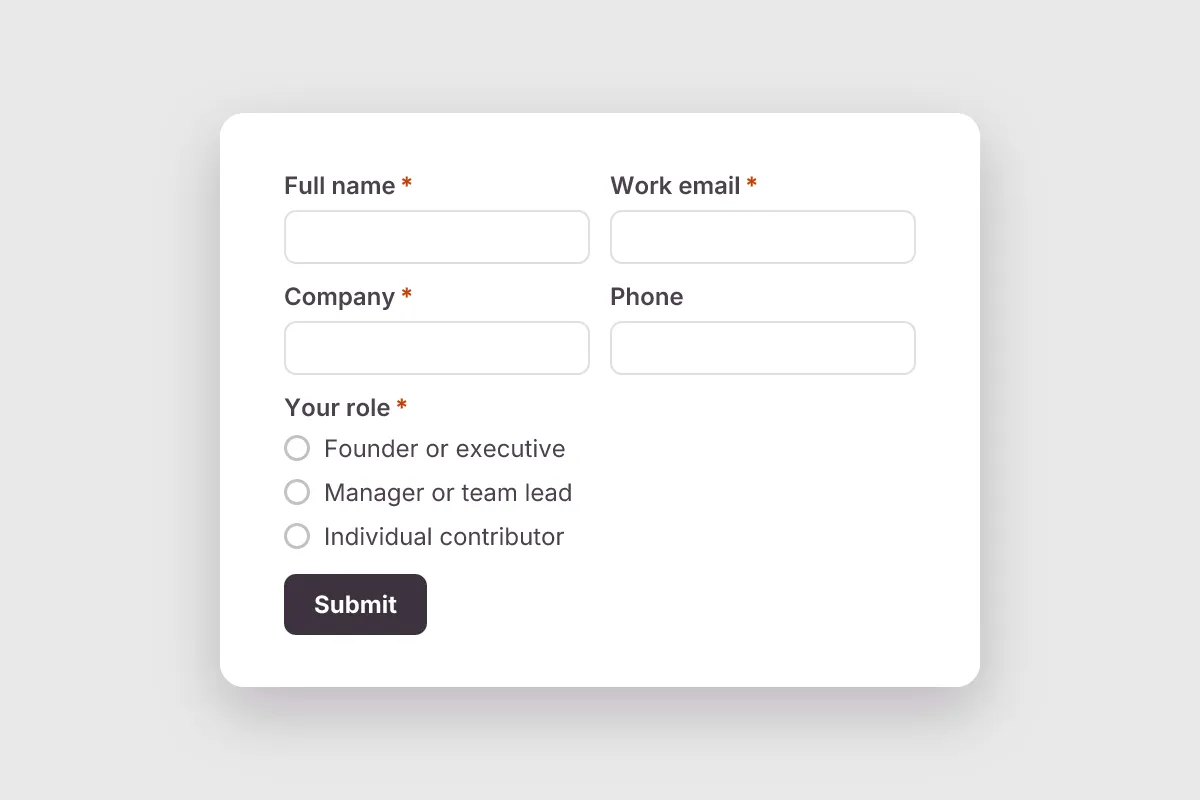
Live preview · nothing you type is sent
Photo by Vitaly Gariev on Pexels
Who it's for
SaaS companies, agencies, B2B service providers, consultants and sales teams running demand-generation campaigns.
- A 'Talk to sales' or 'Book a demo' button on a pricing page
- A landing page for a paid search or LinkedIn ad campaign
- Gating a whitepaper, report or webinar recording
- Collecting leads at a trade show booth through a QR code
What this template asks
Every question can be changed, removed or reordered once it's yours.
Full name*
Short text
Work email*
Email
Company*
Short text
Phone
Phone number
Optional
Your role*
Multiple choice
- Founder or executive
- Manager or team lead
- Individual contributor
- Consultant or agency
- Student
- Other
Company size*
Multiple choice
- 1–10
- 11–50
- 51–200
- 201–1,000
- 1,000+
What are you hoping to solve?*
Long text
When are you looking to start?*
Multiple choice
- Right away
- Within 3 months
- 3–6 months
- Just researching
Estimated budget
Multiple choice
Optional
- Under $1,000
- $1,000–$10,000
- $10,000–$50,000
- $50,000+
- Not sure yet
How did you hear about us?
Dropdown
Optional
- Google search
- Referral
- Event or webinar
- Podcast
- Review site
- AI assistant
- Other
Marketing emails
Checkboxes
- Send me product news and useful guides. I can unsubscribe any time.
Tips for more responses
- 1
Use webhooks to send each new lead to your CRM or a Slack channel the moment it arrives.
- 2
Use conditional logic to ask budget questions only when the timeline is within three months.
- 3
Check response analytics and per-question charts to see which company sizes and needs your campaigns attract.
Questions
What should a lead generation form include?
At minimum a name, work email and company. To qualify leads, add role, company size, the main problem they want solved, buying timeline and budget range, plus an optional marketing consent checkbox. This template uses exactly that set.
How many fields should a lead generation form have?
Fewer fields usually means more submissions, but fewer qualifying details. A common balance is three required contact fields plus three to five quick multiple-choice questions, which is what this template does.
Do I need consent to email leads?
It depends on where your leads are. Laws such as GDPR in the EU and CASL in Canada generally require clear consent for marketing emails, while the US CAN-SPAM Act relies on an easy opt-out. A separate, unticked consent box is the safe default; check the rules for your markets.
What is a marketing qualified lead (MQL)?
An MQL is a lead that matches your target customer profile and has shown buying interest, for example a manager at a 50-person company planning to buy this quarter. Qualifying questions on the form help you spot MQLs automatically.
Is this lead generation template free?
Yes. Copy it into a free Dculus Forms account, change anything you like and start collecting responses. No credit card is needed.
Can I change the questions?
Yes. Your copy opens in the form builder, where you can add, remove and reorder questions, change the layout and add your own branding.
Where do the responses go?
Responses arrive in your Dculus Forms workspace. You can export them to Excel or CSV, send them to Google Sheets or a webhook, and get email notifications.
Can I host it myself?
Yes. Dculus Forms is open source (GPLv3), so you can run it on your own servers and keep every response in your own database.
Similar templates
All templates
Newsletter Signup
Grow your email list: first name, email, topics of interest, how often to send, and a clear opt-in consent box.
- Consent
- Lead Capture
Marketing & Sales · 5 questions · 1 min
Order Form
Take product orders online: items and quantities, size or variant, delivery or pickup, address, date and order notes.
- Orders
Marketing & Sales · 13 questions · 3 min
 Popular
Contact Us Form
A clean contact form that routes every message to the right person, with name, email, topic and message.
- Website
- Lead capture
- Support
Business · 6 questions · 2 min